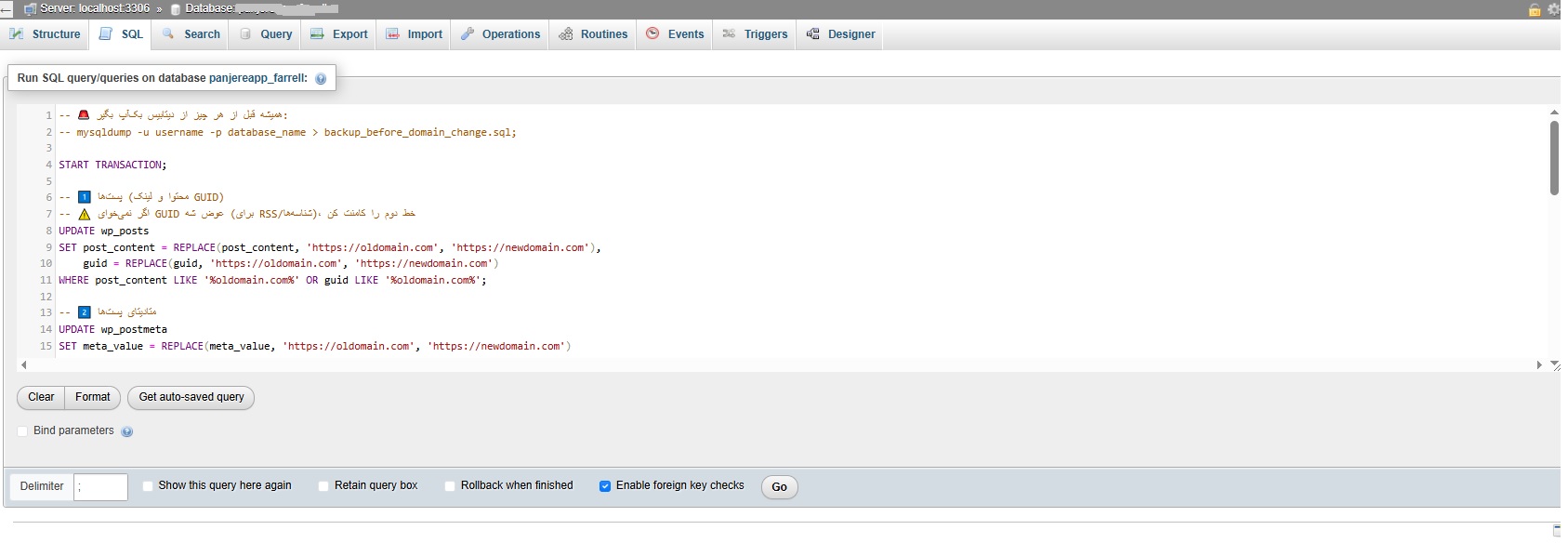
The query I wrote here replaces your old domain with the new one across the database in just a few seconds, as soon as you run it — make sure that you take a backup of the database first, no exceptions.
All links that pointed to the previous domain get rewritten to the new one,
sensitive areas of the data such as guid and serialized data do not get corrupted,
and you can then run the whole script with complete confidence in the result.
In what follows I have written the complete, safe and more professional version of the script for you
-- 🚨 Always take a database backup before anything else:
-- mysqldump -u username -p database_name > backup_before_domain_change.sql;

START TRANSACTION;

-- 1️⃣ Posts (content and the GUID column)
-- ⚠️ If you do not want the GUID to change (RSS and item identifiers), comment out the second line
UPDATE wp_posts
SET post_content = REPLACE(post_content, 'https://oldomain.com', 'https://newdomain.com'),
    guid = REPLACE(guid, 'https://oldomain.com', 'https://newdomain.com')
WHERE post_content LIKE '%oldomain.com%' OR guid LIKE '%oldomain.com%';

-- 2️⃣ Post meta
UPDATE wp_postmeta
SET meta_value = REPLACE(meta_value, 'https://oldomain.com', 'https://newdomain.com')
WHERE meta_value LIKE '%oldomain.com%';

-- 3️⃣ Options (site URL, home URL and the rest of the settings)
UPDATE wp_options
SET option_value = REPLACE(option_value, 'https://oldomain.com', 'https://newdomain.com')
WHERE option_value LIKE '%oldomain.com%';

-- 4️⃣ Comment meta
UPDATE wp_commentmeta
SET meta_value = REPLACE(meta_value, 'https://oldomain.com', 'https://newdomain.com')
WHERE meta_value LIKE '%oldomain.com%';

-- 5️⃣ Comment content
UPDATE wp_comments
SET comment_content = REPLACE(comment_content, 'https://oldomain.com', 'https://newdomain.com')
WHERE comment_content LIKE '%oldomain.com%';

-- 6️⃣ Users (optional — if a URL is stored in a bio or in user meta)
UPDATE wp_usermeta
SET meta_value = REPLACE(meta_value, 'https://oldomain.com', 'https://newdomain.com')
WHERE meta_value LIKE '%oldomain.com%';

UPDATE wp_users
SET user_url = REPLACE(user_url, 'https://oldomain.com', 'https://newdomain.com')
WHERE user_url LIKE '%oldomain.com%';

-- 7️⃣ Plugin content (where custom tables exist)
-- Plugins such as WooCommerce, ACF or Rank Math usually
-- store data in tables such as wp_woocommerce_order_items, wp_yoast_indexable or wp_acf_fields.
-- Add the same pattern for those tables if you need it.

COMMIT;
Important points to keep in mind
For data stored in the database as serialized (such as ACF, Elementor and the like)
This is how that kind of data can be stored in the tables:
# From the WordPress directory over SSH
wp search-replace 'https://oldomain.com' 'https://newdomain.com' --all-tables --precise --recurse-objects
# If you do not want the post GUIDs to change:
wp search-replace 'https://oldomain.com' 'https://newdomain.com' --all-tables --precise --recurse-objects --skip-columns=guid
🧩 2. Final check (the number of rows that still contain a link to the old domain)
Omid Bodagh

I am an SEO specialist who likes helping businesses get seen on Google. From WordPress to SEO, whatever an online business needs to grow, I can help with it.