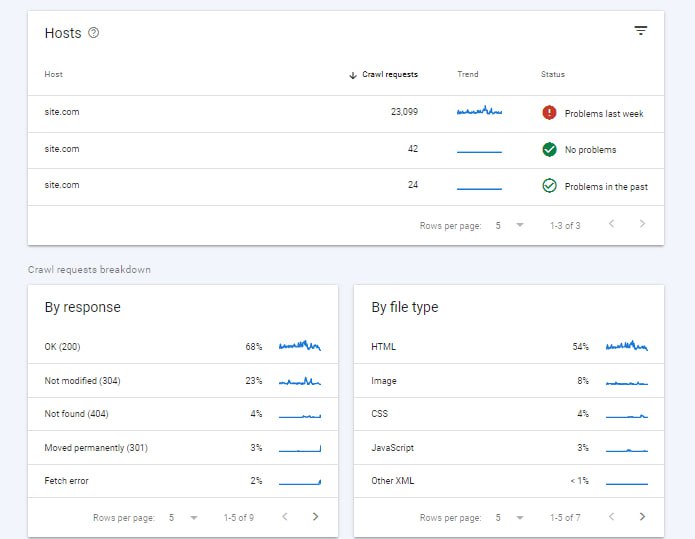
Go into Search Console, to the settings section, then in crawl stats click Open report.
In the host part it shows your site’s address, and next to it there is a colored circle; each circle means something.
Solid green circle: over the past 90 days Google has not met a significant problem when requesting your site.
Hollow green circle: at least once in the past 90 days Google ran into a problem while sending a request to your site.
Red circle: in the past week your site was unavailable at least once. This one has to be investigated.
The By response section also shows the percentage of bot errors. In this image, 4% of them hit a 404 error, which is very bad. For one of our clients it was 80% Page timeout, and that was a genuinely poor situation.
Be sure to check this part so you know the state of bot crawling on your site.
Omid Bodagh

I am an SEO specialist who likes helping businesses get seen on Google. From WordPress to SEO, whatever an online business needs to grow, I can help with it.