Database import errors
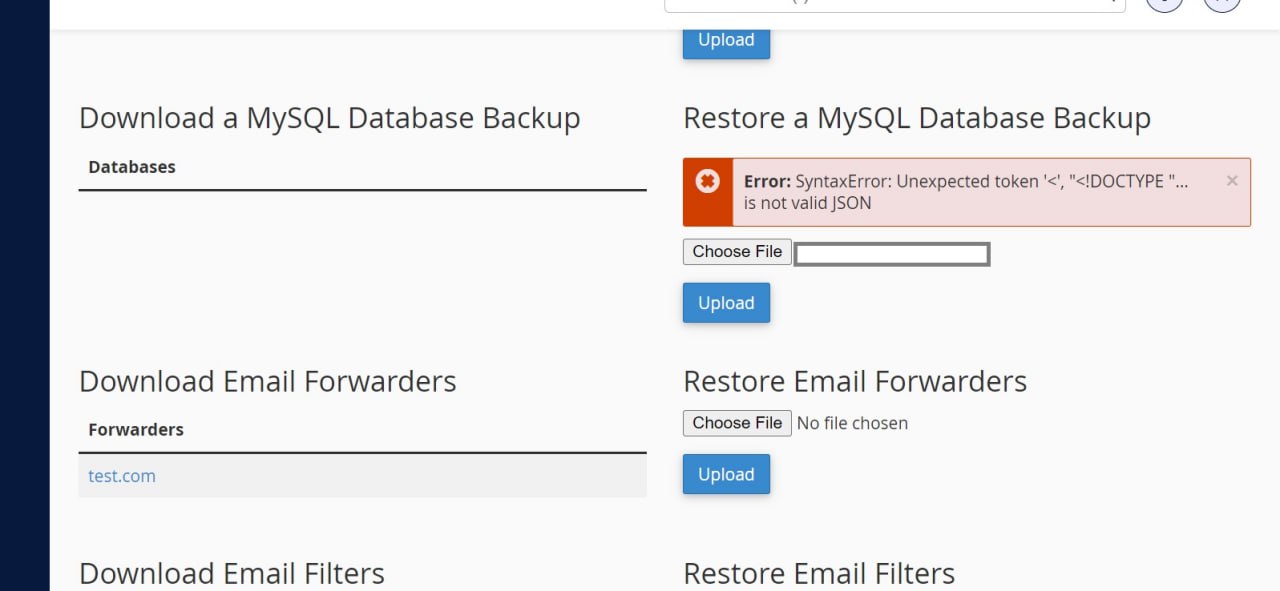
Have you ever hit an error while importing a database in cPanel or phpMyAdmin?
In cPanel you get the error shown above; in phpMyAdmin you get the 500 error.
So where is the problem?
Unfortunately around 90 percent of hosting companies, in Iran and abroad, are only installers of cPanel and DirectAdmin. They do not set the database and cPanel configuration properly, and that is what causes widespread breakage on the sites hosted with them.
Be careful if you hit an error during a database import.
The database reports the operation as complete, and you can check the size of what was imported and see that it looks right — but do not use that database under any circumstances, because it may be corrupt.
To import a database correctly, it is better to use the UpdraftPlus plugin.
The same applies when you move a site: try to do it yourself so you can supervise it properly. Some hosting companies do not care about the errors that appear during a database import and simply pass over them.
Omid Bodagh

I am an SEO specialist who likes helping businesses get seen on Google. From WordPress to SEO, whatever an online business needs to grow, I can help with it.