Why would you remove or neutralize some of your backlinks?
You may have paid for some questionable links, or a competitor may have targeted your website with link spam. Whatever the reason, you need to know what to do next — especially if you have received a warning from Google.
In this article I share how to remove toxic backlinks and weigh the different ways of cleaning up your link profile, because the right method depends on your situation.
Google says that if you have an alert for unnatural links, you should first try to get the links taken down at the other site and only then submit whatever you cannot get removed:
“If you have a manual action against your site for unnatural links to your site, or if you think you are about to get such a manual action (because of paid links or other link schemes that violate our quality guidelines), you should try to remove the links from the other site to your site.”
Google Search Console guide
Here is an overview of what you should do to remove backlinks when a manual action for unnatural links has been applied, according to Google:

The unnatural backlinks alert in Google Search Console
If you do have a manual action (also called a manual penalty), you will see it when you log in to Google Search Console (GSC). Open the Security & Manual Actions tab and click Manual Actions.
If there is a problem, you will see a page like this:

List every domain you want taken off your link profile
Start by going to Google Search Console, exporting all the links from the Links report and adding them to a spreadsheet. These are the links Google itself sees, so there is no need to use a third-party tool at this stage.

Find the unnatural backlinks you want removed
Once you have entered your list of domains into the spreadsheet, you should start a backlink audit to identify the unnatural links. You do not have to remove every spam link in your profile, but it is a good idea to look for the common patterns that explain the cause of the penalty.
If you are not confident about handling backlink removal yourself, ask a reputable SEO consultant to remove the spam and toxic backlinks for you.
What counts as an unnatural link, according to Google?
In short, it is any backlink that is meant to manipulate the ranking in Google’s search results.
Such as:
Paid links
Excessive link exchanging
Automated linking
Requiring a link as part of your ToS
Low-quality directory or bookmark site links
Low-quality, keyword-rich links embedded in widgets
Links scattered across footers or site templates
Forum comments with optimized links
You can use a tool like Ahrefs’ Site Explorer to help you find the spammy or unnatural links.

Here are a few checks you can run:
Are there anchor texts that look spammy or over-optimized?
In Ahrefs’ Site Explorer you can review the Anchors report in the sidebar. If there is a problem, it is completely clear from this report.
Assess the overall quality of the linking domains
Does it look like a site that Google would approve of under its quality guidelines?
Google devotes a whole section of its link spam policies to defining what link spam is, but one of the main things to consider is whether you paid for the links in order to manipulate your Google ranking.
Contact the site owners and ask them to remove the links
Then you should ask them to remove the links from their own site.
Here is an example of the kind of email you can use for a removal request — keep it short and precise, and remember to send it from an email address on your own domain.
Hi {site_owner’s name},
I am currently reviewing the links to my website and I need your help to remove this link:
{irl_irl}
The link points to my website here:
{Your_URL}
Once you have removed the link, I would appreciate it if you could reply to this email.
Thanks,
{your name}
{firstname.lastname@yourwebsite.com}
SIDENOTE. You can also ask site owners to add a nofollow tag to the links, but in my experience it is easier for them simply to remove the link.
After a few links have gone, you can start updating your list. Some site owners will not answer your email. Others will agree to take the link down but charge a fee for removing it.
In situations like this, John Mueller has said:
“If there are some links that you cannot remove yourself, or if some of them require payment, having those in the disavow file is fine too.”

Neutralize every backlink you cannot remove
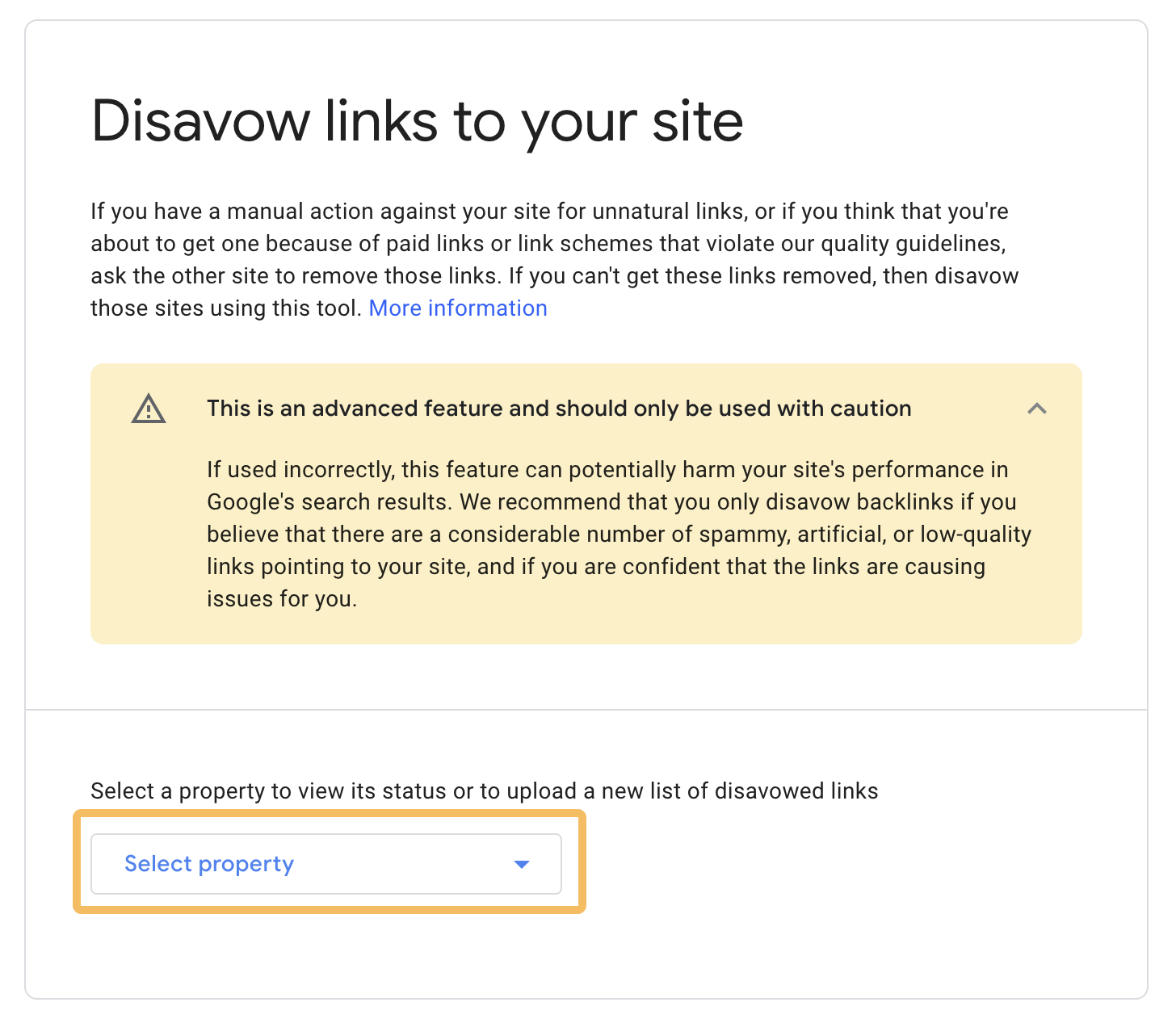
If you have tried to get the backlinks removed and they cannot be removed, you should disavow the links.
Google says:
We recommend disavowing backlinks only if you think a considerable number of spammy, artificial or low-quality links point to your site and if you are confident that the links are causing problems for you.
Google Search Console guide
John Mueller confirmed the same point in a since-deleted tweet, saying that if you paid for links and cannot get them removed, you should disavow them.
If you choose the disavow route, please pay attention to this caution from Gary Illyes:
Gary Illyes, Webmaster Trends Analyst at Google
The risk with disavowing is that you can lower your site’s rankings by disavowing the wrong links. So it is important to be sure that the links you add to the disavow file really are causing problems for your site.
Google also gives precise instructions for preparing your Disavow.txt file, and you should follow them.
Once you have a list of the domains you believe are unnatural, format your disavow file in this style:
# Two pages to disavow
http://spam.example.com/stuff/comments.html
http://spam.example.com/stuff/paid-links.html

# One domain to disavow
Domain:shadyseo.com
If you already have a disavow file, download it and update that one instead. If you upload a new file, it overwrites the previous version rather than adding to it.
Disavow tool link: https://search.google.com/search-console/disavow-links

Submit a review request
Once you have removed as many unnatural links as you reasonably can and uploaded your disavow file in GSC, you can request a review. You do that by clicking the review request button.
If Google decides that you have done a good enough job, it will lift the warning. If not, you may have to repeat this process until the manual action is removed.
Omid Bodagh

I am an SEO specialist who likes helping businesses get seen on Google. From WordPress to SEO, whatever an online business needs to grow, I can help with it.