The rel=”nofollow” tag is one of the simplest HTML tags anywhere on the web, and it matters a lot for working out whether you are actually doing SEO. In this guide, learn everything you need to know about nofollow links.
Nofollow links are nothing new. They have been on websites for 14 years.
If you care about how your website performs in search engines, knowing when to use nofollowed links — and when not to — is not merely important, it is essential.
In this guide, I will explain how nofollowed links came to exist, how they help SEO, and how using them correctly can protect your site from terrible Google penalties.
But first, let’s cover the basics
What are nofollow links?
Nofollowed links are hyperlinks carrying a rel=”nofollow” tag.
They have no effect on the search engine ranking (PR) of the destination URL, because Google passes no PageRank and no anchor text through them. Google does not even crawl them.
Today, WordPress — like many other CMSs — adds the nofollow tag to comment links by default. So even if you have never heard the phrase before, you can be sure that any spammer commenting on your blog is probably getting no SEO benefit for the effort.
That said, if you worry that your own comments may not be followed, here is how to double-check:
Find a comment
Right-click on the link
Hit “inspect”
Look at the highlighted HTML code.
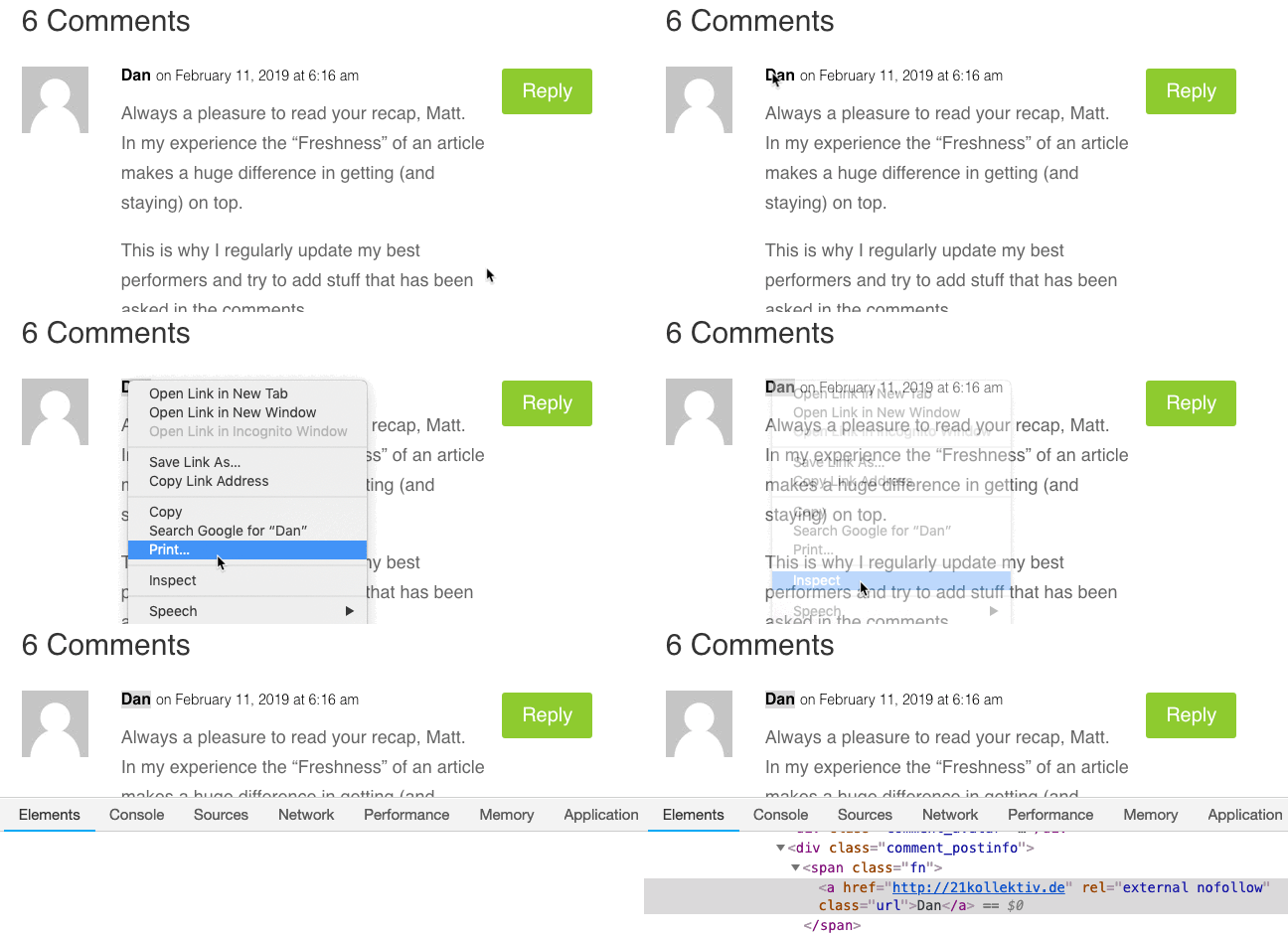
If you see a rel=nofollow tag, the link is nofollowed. If you do not, credit is being passed.
Digging through HTML is not comfortable for everyone? Install the Nofollow Chrome extension, which clearly marks every nofollowed link while you browse the web.
2009: Google fights PageRank manipulation
PageRank flows around a website through internal links (links from one page on a site to another page on the same site).
For example, some of the PageRank of this article is passed to other pages on our site through links like this one. In general, higher PageRank means higher rankings.
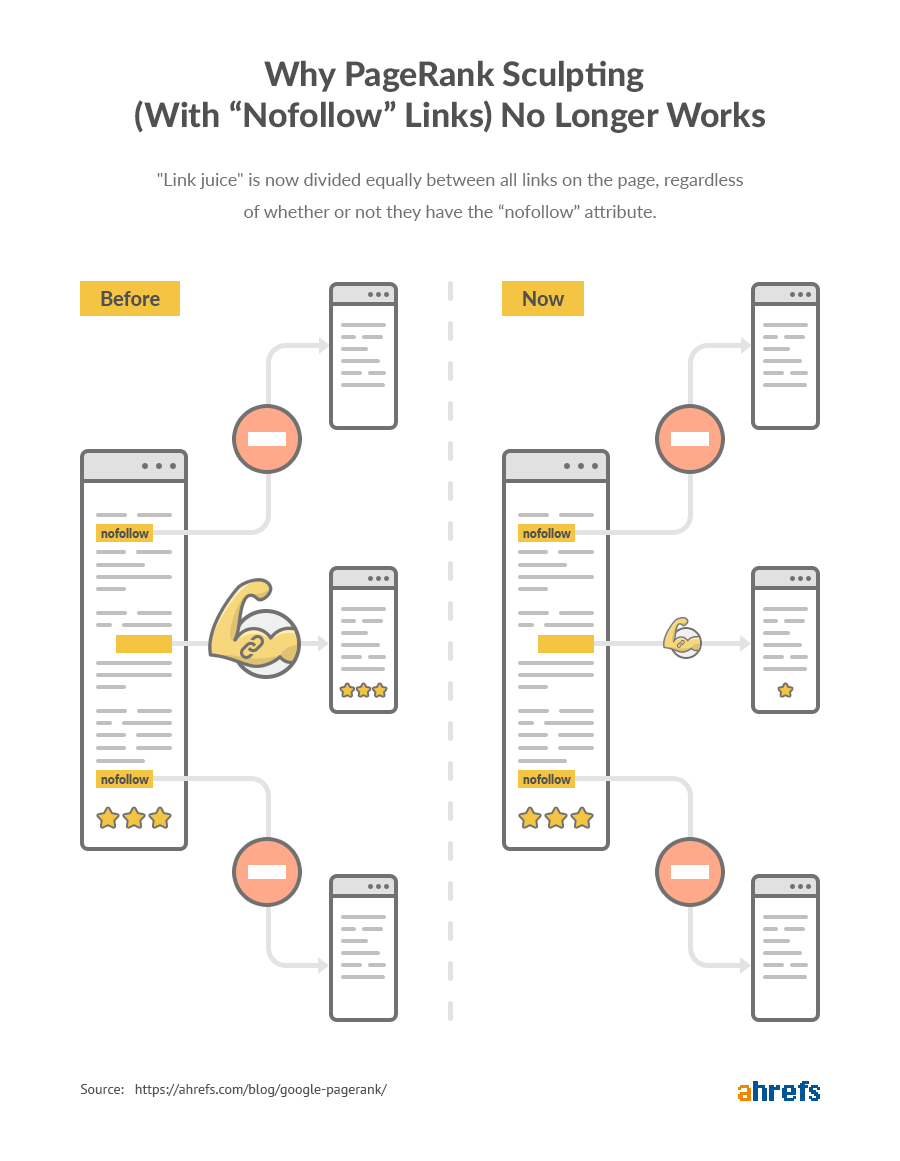
However, PageRank only flows through followed links, not through nofollowed ones.
It has always worked that way, but the way PageRank is shared out among the followed links on one page has changed over the years.
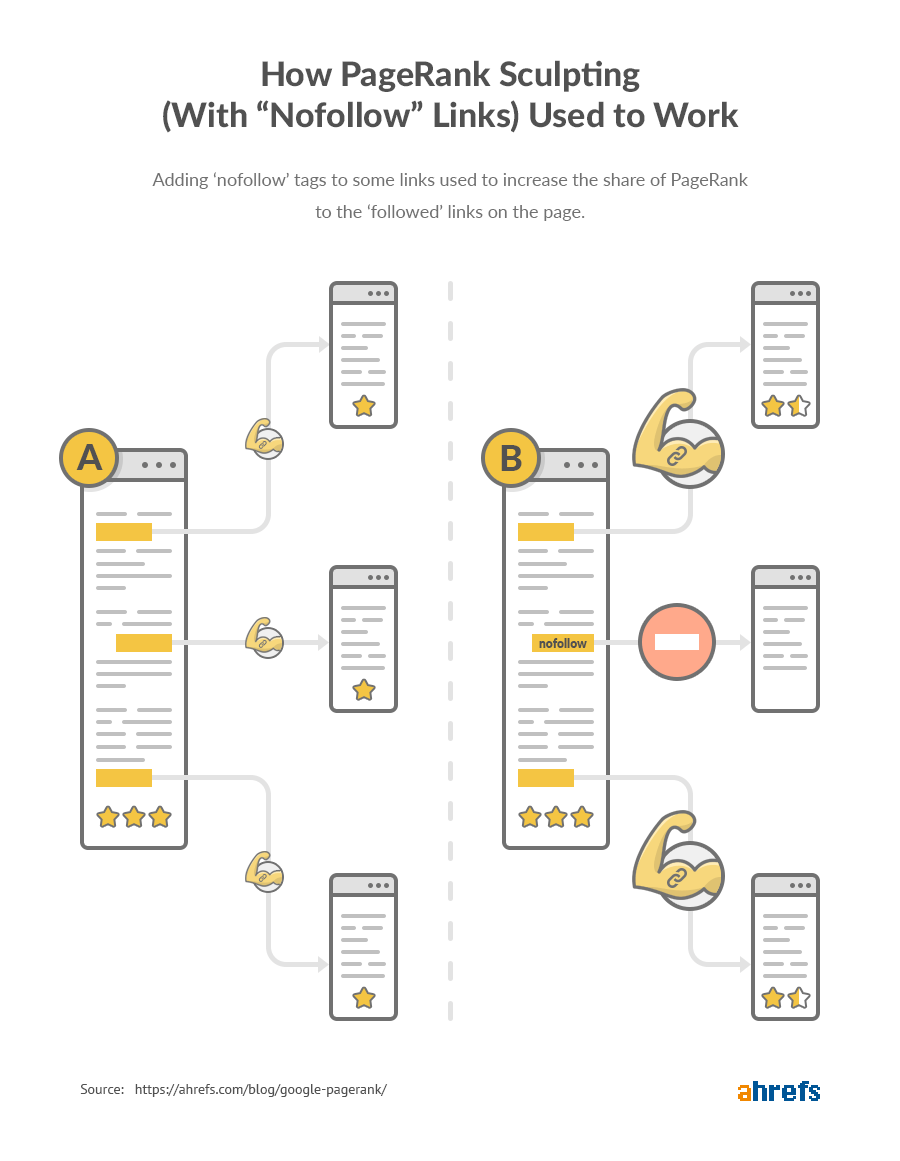
Before 2009 it worked like this:
If you had three links on a page and one of them was nofollowed, the whole PageRank of that page was split between the two followed links.
 Important note
PageRank is a complicated algorithm. Google made this change ten years ago. While they have not publicly announced any other change to how PageRank works in recent years, at least some behind-the-scenes changes have almost certainly happened.
While passing PageRank this way is no longer a thing, ‘nofollowing’ some of your internal links can help prioritize crawling, because Google does not crawl nofollowed links.
That said, this is a somewhat advanced subject, so I will not go further into it here.
2013 onwards: Google fights paid and spammy links
Google classifies bought or sold links that pass PageRank as a violation of its webmaster guidelines.
Because of that, every paid or spammy link should be nofollowed.
This has been the case for years — long before 2013.
Still, from what I can see, Google became increasingly worried around that time about the effect of undisclosed paid links on its algorithm … and it has been that way ever since.
People treat links as an editorial decision. They link to something because it stirs passion in them. It is interesting. They want to share it with their friends. There are reasons they want to highlight that specific link.
The problem is that some paid links look no different from earned links. Think about the difference between a link in a paid review and a link in an unpaid one.
On the surface, both links look identical. That is why there has to be a way to disclose paid links to Google.
Consider this: there are two ways to get an Oscar:
Option number 1: live to act, keep improving your craft, and work hard for years.
Option number 2: buy six of them on Amazon for $8.97…
The nofollow tag (on paid links) is to Google what the $8.97 sticker on the bottom of your fake Oscar is to your friends: a sign that you did not get this legitimately and therefore do not deserve the credit. What an idiotic manipulation attempt.
Do nofollow links help SEO?
Let’s briefly review what Google says about how it handles nofollowed links:
Google does not pass PageRank through these links.
Everything sounds clear enough until you read the sentence right before that one:
In general, we don’t follow them. This means that Google does not pass PageRank or anchor text across these links.
In general — I think this phrase is vaguer than it should be, and it means that they do follow nofollowed links in some cases.
What those cases might be, nobody knows.
Some believe that all nofollowed links still pass some PageRank. Some think Google passes PageRank to some but not all of them. Others think people read far too much into words that have not changed in the better part of seven years.
Earlier this year, Ahrefs studied 44,589 SERPs to see whether Google rankings correlate with different backlink attributes, one of which was the number of followed backlinks.
Here is what they found:
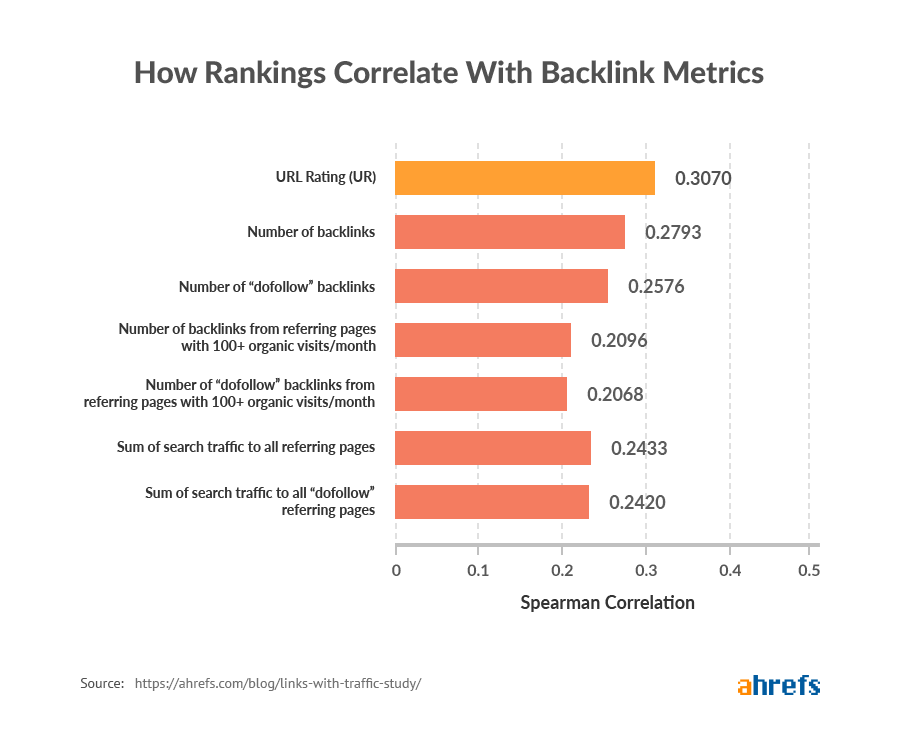
Their correlation for the number of “dofollow” backlinks is slightly weaker than for the total number of backlinks.
This is what the team said about it:
This could indicate that Google values some nofollowed links from strong pages more than followed links from weak pages.
But even if we assume that nofollowed links have no direct impact on SEO, they can still have an indirect effect, because:
1. They help diversify your link profile
Natural backlink profiles are diverse.
Some links are followed and some are not. That fact is unavoidable, because some people will inevitably link to you through nofollowed links … no matter how much you wish it were otherwise.
On top of that, most backlinks you get from these places are nofollowed:
Social networks (Facebook, Twitter, YouTube, etc.)
Forums (Reddit, Quora, etc.)
Press releases
Guestbooks (1998!)
Wikipedia (note: anyone can edit a Wikipedia page)
Pingbacks
Directories
In short, if a website has only followed backlinks, or a very high percentage of them, then that is a sign that something is going on.
To check the followed versus unfollowed ratio for any website or web page, the Overview report in Ahrefs Site Explorer gives you that ratio right away.
Site Explorer > Enter any domain, URL or subfolder > Overview
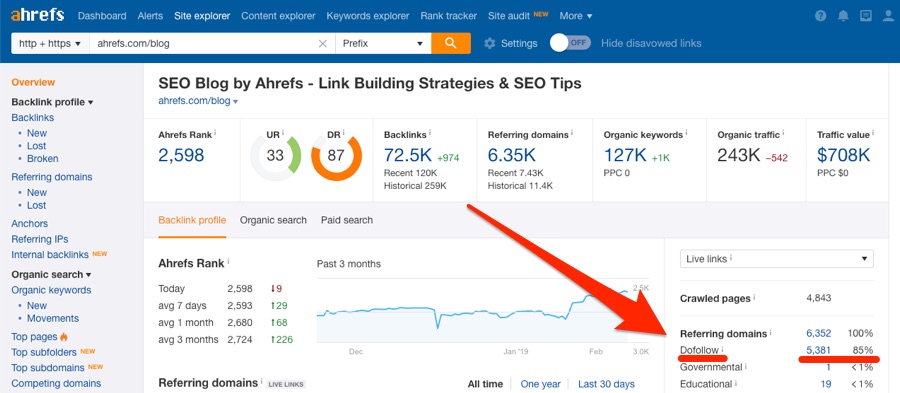
It looks like 85% of the referring domains (the linking websites) to the Ahrefs blog are followed.
Is that good or bad? Honestly, as long as there is variety here, it is a good sign.
What you do not want to see is 100% “dofollow” or anything close to it, because that is a clear sign of manipulation. From experience, I can say that 60 to 90% is natural — but that range is not definitive. If you suspect dirty play, dig deeper.
2. They drive traffic, and traffic follows links
Links are not useful only for SEO purposes. They also drive referral traffic.
That is why we are very active on Quora.
If you have never heard of Quora, it is a question-and-answer website where anyone can answer the questions people post. In those answers, Quora allows linking to relevant sources.
Unfortunately, since every outbound link on Quora is unfollowed, that kind of link has no direct impact on SEO.
But here is the interesting part:
If we check the backlinks report for ahrefs.com in Ahrefs Site Explorer and filter for “dofollow” links only, this is one of the backlinks we see:

Now let’s take a closer look at the referring page (the page the link below came from):
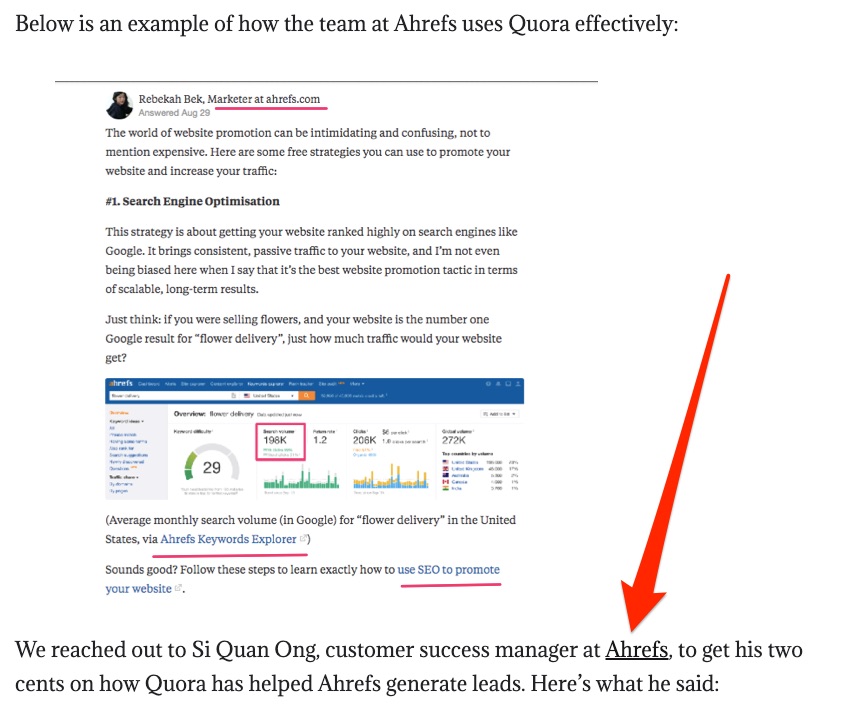
The only reason we earned this followed link is that the author of that article happened across Rebekah’s Quora answer by chance. In other words, an unfollowed link indirectly led to a followed one.
So remember this: for someone to link to you, three things have to happen in this order:
- They see your content
- They enjoy it
- They recommend it to others (through a link on their own site)
Since unfollowed links can help with the first step, they are often a catalyst for followed links.
3. They can protect you from Google penalties
Sometimes there are legitimate reasons to pay for links.
If a website has a lot of traffic, buying a sponsored post on it may make perfect sense. And if you are paying good money for a feature, you probably want an extra backlink so readers can easily find your site.
The problem? Google states that followed paid links go against its webmaster guidelines.
That said, the SEO community is broadly split into two camps:
- Those who believe Google can accurately identify paid links algorithmically.
- Those who believe Google cannot reliably identify paid links algorithmically.
Reporting bought or sold backlinks to Google
For now, let’s assume camp number 2 is right and that Google is trying to spot every paid link. That means you are safe buying and selling links to your content, right? Not so fast.
Google has a tool that lets anyone report a website for buying or selling links.
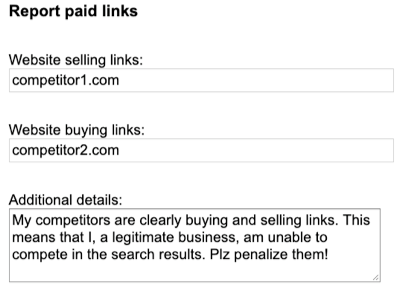
To report spammy or purchased backlinks, open this link and submit the report.
So why don’t they report you?
If doing so led to Google’s webspam team taking a look at your website, discovering the paid links and issuing a manual penalty, then that would be one fewer competitor for them in the SERPs.
Which brings us, as it regularly does, to this:
How to audit your website for nofollow link problems
Earning backlinks that violate Google’s webmaster guidelines is dangerous.
The same is true of the outbound links on your own website that should be nofollowed.
But this is not only about Google’s wrath (that is, penalties). Some nofollowed internal links may also be holding your SEO performance back.
What follows is a quick audit that helps you identify and remove such problems
1. Look for followed backlinks with keyword-rich anchors
In most cases people do not use exact-match anchor text when they link to your site. That is why followed links with exact-match anchors can be a sign of backlink manipulation.
To find them, use the Anchors report in Ahrefs Site Explorer.
Site Explorer > Enter your domain > Anchors > dofollow filter
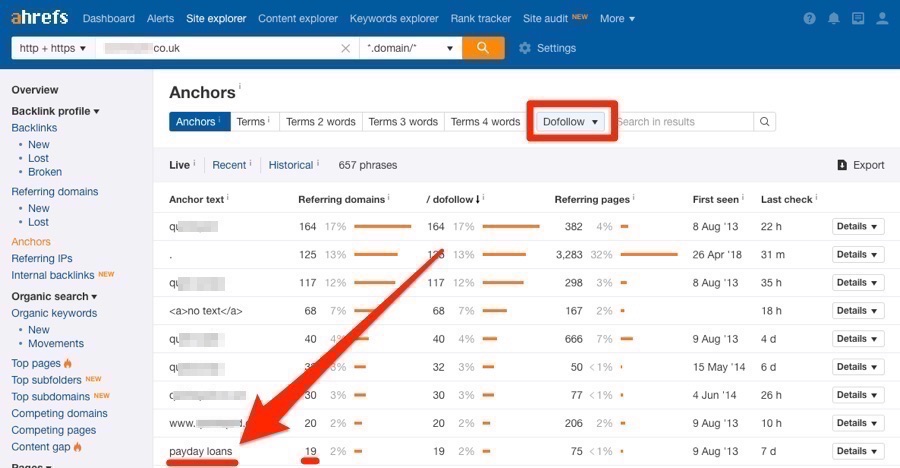
Here we see that most of this website’s anchors are branded or generic (blurred for privacy reasons), but nineteen websites (referring domains) link to it with the phrase “payday loans” as the anchor.
If we click the caret, then Referring domains, we can see which websites they are.
Then, if we click the caret again, we can see the context of every link from each domain.
Here are some rough guidelines for handling the types of links you will find here:
Paid links on low-quality sites. Ask that the link be removed (preferably) or nofollowed. If that fails, disavow it at the page or domain level.
Guest post bio links. Have you ever used keyword-rich anchors in your guest post author bio? Ask whoever runs that site to replace the keyword-rich link with a branded one. Or, if you would rather keep the anchor, ask them to make it unfollowed.
HTML widget links. Change your widget so the link is nofollowed. Ask the people who already embedded your widget not to follow the link.
Sitewide links. Ask that the link be nofollowed or changed to a branded anchor.
Note that followed exact-match links are not always a sign of low-quality or paid links. Such links can be created naturally and under legitimate circumstances.
That is why you should always make sure you inspect the links in depth before rejecting them or asking that they be unfollowed.
Fail at this, and you may end up doing more harm than good.
2. Look for sponsored backlinks
Backlinks from sponsored posts should always be nofollowed.
That is because you are effectively paying for the link, so it should not pass PageRank.
To find links like these, search for the word “sponsored” in the Backlinks report for your website in Ahrefs Site Explorer.
Site Explorer > Backlinks > search “sponsored” > filter for “dofollow”
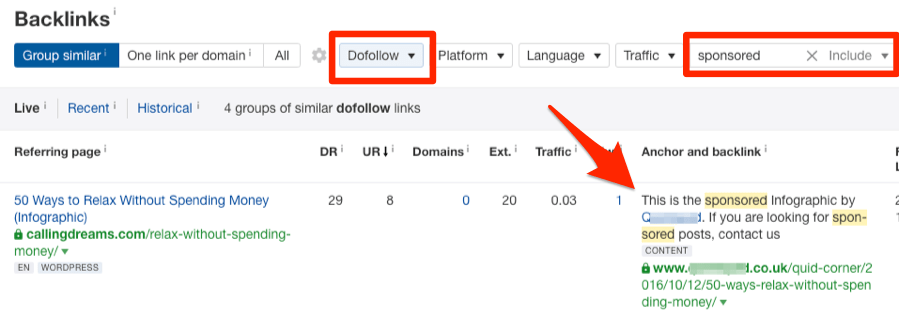
Reach out and ask that such links be nofollowed.
3. Look for keyword-rich followed outbound links on your own site
Did you know that Forbes nofollowed every one of its outbound links in 2017?
The move came after they discovered that some of their contributors were selling followed links from their articles. Since they have a great many contributors, they concluded that checking every link on the site was impossible, so they took the lazy option and made everything unfollowed.
Why is this relevant?
Because if you have ever accepted guest posts on your site, or you have user-generated content, you may be facing the same problem.
To find out whether that is the case, take a look at your outbound links in Ahrefs Site Explorer.
Site Explorer > Enter your domain > Outbound links > Anchors > add the “dofollow” filter
4. Look for sponsored links on your own site
Have you ever accepted a sponsored post on your website? Did you make sure the link was not followed?
If you are not sure, it may be worth checking.
To do that, search site:yourwebsite.com “sponsored post” in Google.
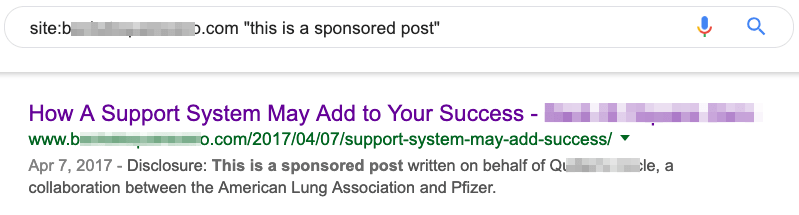
Open the results one by one and find the sponsored link.
If you have installed the Nofollow Chrome extension, every nofollowed link on the page is highlighted — so the sponsored link should definitely be highlighted. If it is not, it is a followed link.
5. Look for nofollowed internal links
No internal link should be unfollowed unless it points to trivial pages you want dropped from the search engine index.
To find nofollowed internal links, use the Best by Links report in Ahrefs Site Explorer.
Site Explorer > Enter your domain > Best by Links > switch to Internal > sort by the “nofollow” column
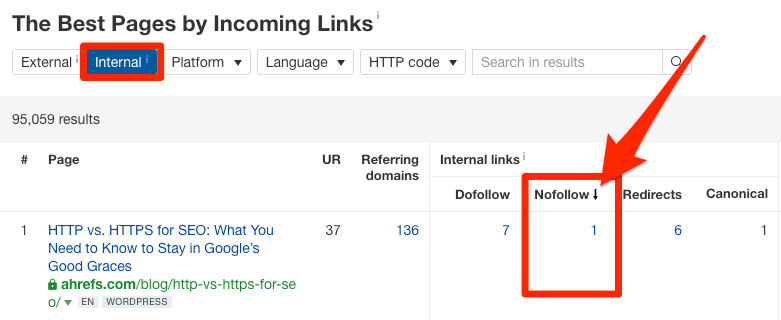
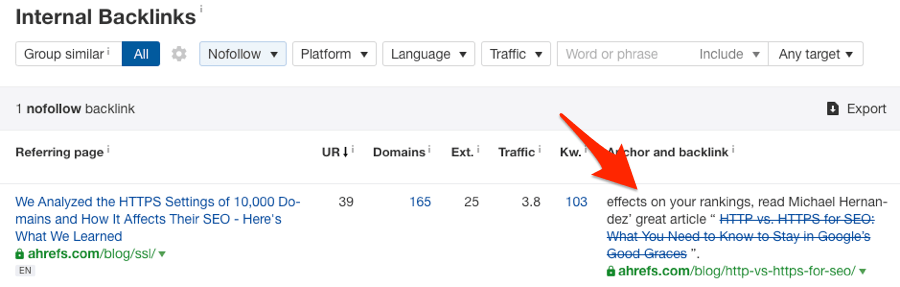
If you see a page with nofollowed internal links, click its number to find out where those links come from and investigate further. These cases may be perfectly reasonable (for example, unfollowed internal links pointing to a login page).
However, if there is no clear reason for the links to be nofollowed, remove the nofollow tag.
Here is exactly that situation: for some reason we have an unfollowed link from one blog post to another.
Nofollow links play an important role in SEO.
We hope this guide has armed you with the knowledge you need to make nofollow links work for you … not against you.
Before wrapping this up, I have one final — probably obvious — note: if you are actively building links to your website, then it makes sense to prioritize building followed ones. Those are the links that pass PageRank and have a direct impact on SEO.
Omid Bodagh

I am an SEO specialist who likes helping businesses get seen on Google. From WordPress to SEO, whatever an online business needs to grow, I can help with it.