Are you looking for the best SEO checker and website analysis tool?
SEO tools can help you review your search optimization and get a clear picture of it, give you ideas for improvement and help you grow your website’s traffic from search.
In this article I share my expert picks from the best SEO checkers and website analyzers.
Why use an SEO analysis and website analyzer tool?
An SEO checker and website analysis tool can tell you whether your search engine optimization (SEO) strategy is working properly or not.
With an SEO checker you can see whether your website is optimized for search and what changes you can make to bring in more traffic.
SEO analysis and website analyzer tools can help your website in many ways.
They help you fix any SEO error that is holding your site back
You get more traffic simply by making the improvements
They track off-site SEO strategies such as building backlinks
They find the areas where you can outrank your competitors
With that said, let us look at the best SEO checker and website rank tracking tools that you can use to grow your business.
1. AIOSEO
All in One SEO (AIOSEO) is the best SEO plugin for WordPress, used by more than 3 million websites. It is the most complete analysis tool here: it goes through your website and tells you how you can improve your search optimization.
It is very beginner-friendly, with a simple setup that walks you through choosing the best settings for your own site.
It analyzes the whole WordPress site and gives you an SEO score, along with a detailed report of what you can change.
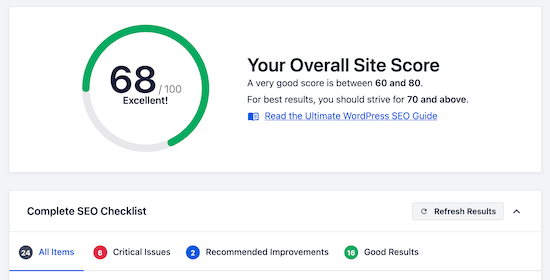
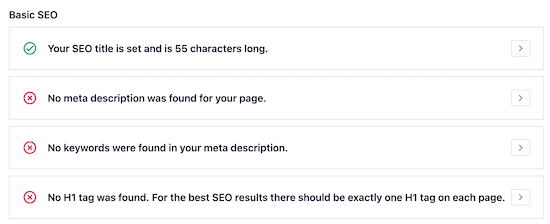
For example, it may tell you to add internal links and external links, fix broken links, change your headings, and add meta descriptions and meta tags among other things.
Even if you have never done search optimization before, this plugin teaches you and shows you what to fix.
You can also optimize every post and page in your WordPress blog completely by customizing the meta title, the meta description and more. Each page gets a TruSEO score, and the score rises as you make improvements.
Make all the changes this plugin suggests and your on-site SEO will be close to perfect, and you will bring more traffic to your website easily.
There is also a competitor research feature that shows you how well optimized your competitors are.
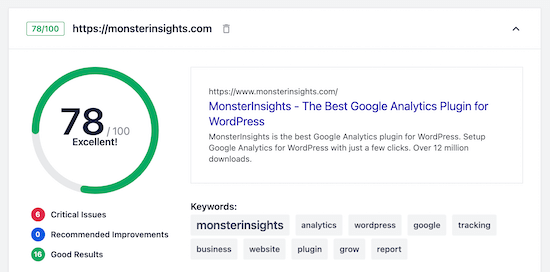
AIOSEO also ships with smart XML sitemaps, rich snippet schema markup, a robots.txt editor, built-in social media integration and a great many other useful features for increasing your visibility to search engines.
2. SEMRush
SEMRush is one of the best SEO tools on the market. WordPress blogs, SEO experts and business owners of every size use it.
We here at WPBeginner use SEMRush for many tasks, such as keyword rank tracking and keyword research.
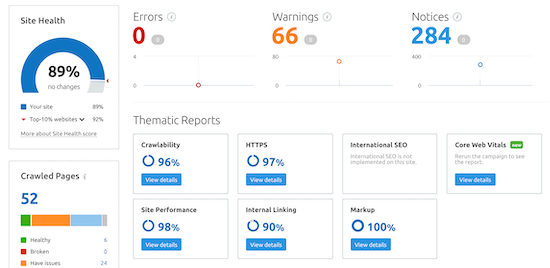
You can use this tool to analyze your own website and to do SEO research.
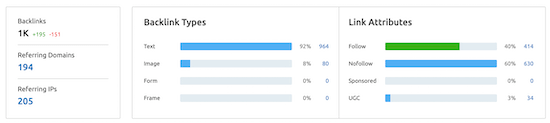
There is a backlink checker that shows every site linking to yours, together with its authority and the anchor text used.
It tells you whether your link building efforts are working and even helps you find potential companies. It can also help you identify spam links before they damage your rankings.
As you work on your strategy, the keyword tracker shows whether your positions are improving.
You can follow the specific keywords that are most valuable to your business.
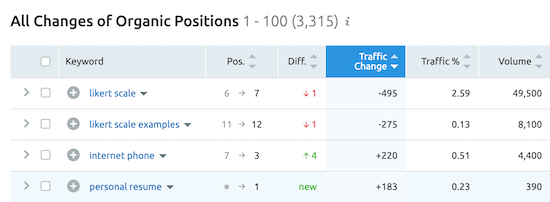
You can take the 7-day free trial or use the limited free plan, which gives you access to basic SEO and website data.
If you want detailed reports and deeper analysis features, the premium plans start at $119.95 per month and give you full access to website, SEO and traffic data.
3. MonsterInsights
MonsterInsights is the best Google Analytics plugin for WordPress, used by more than 3 million websites. It lets you set up Google Analytics in WordPress easily and see your traffic metrics right in the WordPress dashboard.
You can also monitor your keyword rankings in that same dashboard. You can view your Google Search Console report and see the top 50 search phrases your website ranks for.
To reach this report, you first have to connect Google Search Console to the Google Analytics account.
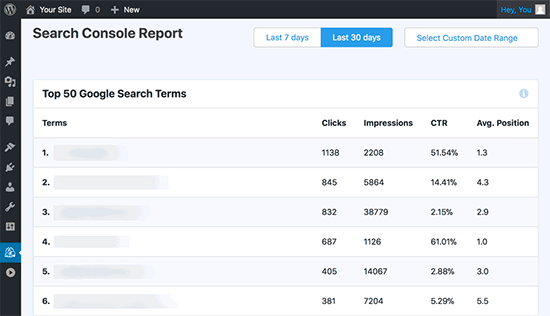
It also shows the impressions, clicks, click-through rate and average position for each keyword.
You can use that data together with the optimization tips AIOSEO gives you to lift your rankings. For example, if you find an article sitting at position 11 or 12, you can optimize it to bring it onto the first page.
A free version of MonsterInsights is available, but the professional version gives you advanced tracking, extra data, eCommerce integration and more.
4. Serpstat
Serpstat was a wide range of different SEO tools that could provide deep website analysis. Its feature set is very rich and it still offers a great user experience.
Its features let you check your website traffic and SEO performance, run an SEO audit of your site, analyze your backlinks and check the rankings of specific keywords.
The site audit tool shows any technical SEO problem that affects your site’s visibility and performance. The analysis report lists the most important issues first and gives you recommendations for fixing them.
There is also a page analysis tool that lets you compare a page on your website with a similar page on a competitor’s site.
That shows you whether your optimizations can help you get ahead of your competitors on the search engine results pages (SERPS).
You will also find a backlink analysis tool for reviewing and monitoring your site’s backlinks.
On top of that there is a keyword rank tracker, so you can watch your positions improve over time.
The free tool gives you access to part of the website data available for your domain name. The premium version starts at $69 per month and gives you access to all the data the tool provides.
5. Google Search Console
Google Search Console is a free website SEO checker from Google that helps you control and maintain your website’s presence in search engines.
Since Google is the largest search engine in the world, you should make sure your site displays correctly in Google Search and has no search errors.
It shows how your website appears in organic search, whether it has crawling, mobile usability or indexing problems, and even whether it has duplicate content issues.
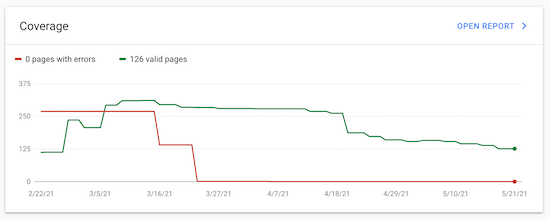
The tool also lists the keywords your website currently ranks for, together with impressions, position, click-through rate and more, and you can use that information to improve your click-through rate and gain more traffic.
You can also use the data to come up with new blog post ideas and bring in more visitors.
For more detail, see our beginner’s guide to using Google Search Console effectively.
Pro tip: you can use MonsterInsights to track your keyword rankings right inside your WordPress admin area, using Search Console data.
Google Search Console also has a page speed report that shows whether any pages on your site have speed and performance problems.
Ubersuggest is a free and premium SEO ranking tool from Neil Patel that can put a large amount of useful SEO and organic traffic data in front of you.
Once you create an account, you can add a website to the tool and run an SEO check. Doing so tests your site against the common ranking factors to see whether it has any problems.
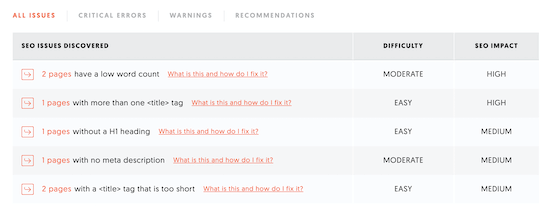
It is not as deep as other tools such as AIOSEO and SEMRush, but it still gives you valuable data.
The tool also includes a traffic analyzer that gives you close numbers on a competitor’s traffic levels, keywords and backlinks.
You can use that information to improve your off-site strategy and your content marketing efforts.
The free version gives you full access to the SEO audit tool along with three free searches a day. Premium plans start at $29 per month and give you unlimited access to searches and traffic data.
Which Is the Best SEO Checker and Website Analysis Tool? (Expert Picks)
After using the most popular SEO checkers and website analyzers, we believe AIOSEO and SEMRush are the two best tools on the market.
AIOSEO is the best WordPress SEO plugin and tool. Optimizing your website for search becomes very simple.
SEMRush is the more advanced tool: it helps you fix more technical errors and build your whole strategy.
Our team uses ahrfs and SEMRush to improve our own rankings.
We also tried other analyzer and audit tools such as Ahrefs, WooRank and Moz, but we decided to keep this list short to make your decision easier.
We hope this article helped you find the best SEO checker and website analysis tools for yourself. You may also want to see our list of the best email marketing services and our expert picks of essential WordPress plugins for business sites.
Omid Bodagh

I am an SEO specialist who likes helping businesses get seen on Google. From WordPress to SEO, whatever an online business needs to grow, I can help with it.